Part 2: Documenting the Data

Kim Learns about Metadata
Kim has now taken stock of Professor Smart's data, noting in appropriate detail its types and formats, as well as documenting the size of it and estimating its rate of growth. Familiarizing herself in this way with the data, she's now ready to think about how to describe what it is and investigate what the community of researchers working with similar data use to describe it. She's heard of “metadata” but is not quite sure what it means or why she might need it.
In this part, you will understand the value of metadata and metadata standards, including the following:
- Determine what metadata are required (what information about your data is important to document?)
- Document how metadata will be recorded (who's going to do it? where? with what frequency?)
- Review directory and file-naming conventions
2.1 What is Metadata?
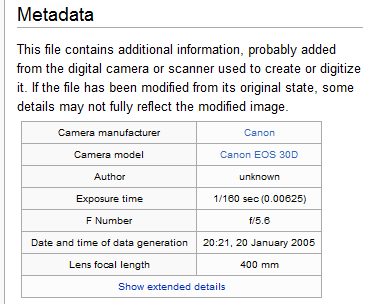
Further documentation and description about your data are needed beyond details about its types and formats. Such description, also known as “metadata,” answers the following questions about your data:
- Who created it?
- What is it?
- When was it created?
- How was it generated?
- Where was it created?
- How may it be used?
- Are there restrictions on it?
Metadata is, literally, “data about data” - meaning, it is information about a resource. Any answers to the above questions would then serve as metadata.
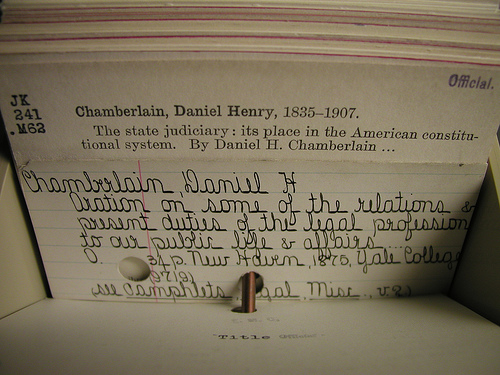
In the context of a DMP, the resource being described and managed is data. In fact, documenting the types and formats of your data, as described earlier, could also be seen as capturing metadata.
Examples of metadata elements that may be used to describe data:
- Title of the project
- Names of researchers involved
- Abstract or summary about the project and the data
- Research topic, or subject of research
- Temporal coverage / information
- Spatial coordinates / Location information
- Instrumentation used
- Access or rights policies/restrictions
- Hardware and/or software used
Metadata also helps organize information about a resource and give it a structure, which enhances search and discovery of data, as well as enables easier access to it.
Your community of interest (research community) may have recommendations as to what kind of metadata to capture. The next section gives some guidance on where to obtain such information.
2.2 The Importance of Standards in Metadata
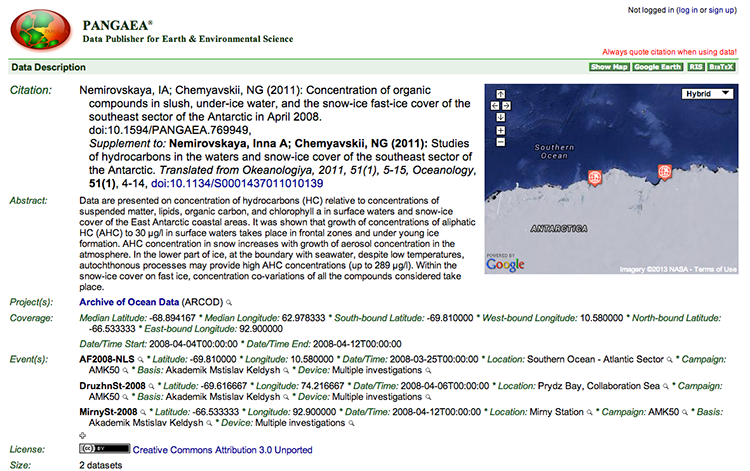
In documenting your data with metadata, it is important to adhere to standards - standard vocabularies, standard schemas, etc. Organizing your data using a standards-based approach helps ensure interoperability between systems, which also enhances discovery of, and access to, data. To Ben Goldman, metadata is an essential tool for managing collections, and adherence to common standards is vital to making the data reusable. He shares some of his experiences with trying to decipher old data in the video below.
One common standard or schema followed in many repositories is the Dublin Core Metadata Element Set [5], which has 15 metadata fields (e.g., creator, title, subject, rights, description, etc.). Your research community may already have metadata standards that it follows. A useful list of disciplinary standards to consult is at the Digital Curation Centre (DCC) [6]website. Another way to find out more about metadata standards for your research data is to consult the data repositories that your data might be suitable for. Two registries of repositories, in particular, are worthwhile checking out:
- DataBib [7] is searchable catalog / registry / directory /bibliography of research data repositories.”
- DataCite Repositories List [8] - Working document listing data repositories.
You might also consult the metadata librarian at your institution's library to find out more about what standards to apply to your data. Ultimately, an exploration of these standards can provide insight into what kind of information about your data is important to document.
Dr. Alfred Traverse, Curator of the Penn State Herbarium, has extensive experience in managing large of collections of specimens with varying levels of metadata. In the video below, he describes two specimens from the Herbarium's collection, how they were preserved, and their recorded metadata. It is a good illustration of how metadata standards change over time. Standards evolve much as data collection practices do.
2.3 Recording the Metadata
Additional information you may wish to include in a DMP is a brief statement on who will be responsible for recording metadata and having oversight of it, as well as how metadata will be recorded (e.g., in a spreadsheet, or through some other means - perhaps automated).
At the Herbarium, Dr. Traverse copes daily with challenges related to file names and limitations on how the metadata for the specimens was and is recorded. In the following video, he describes some of these challenges as well as how advancements in science can also impact metadata.
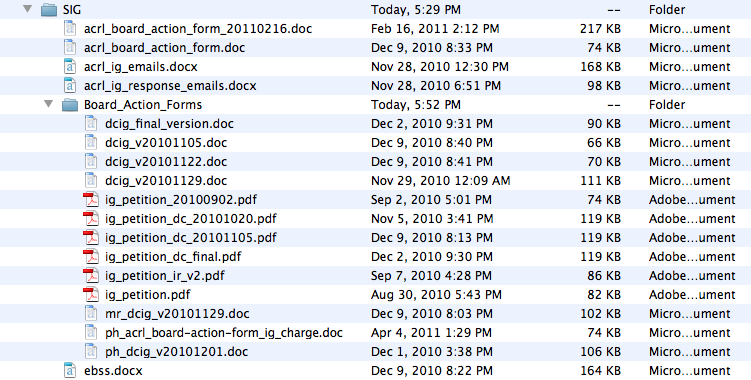
One aspect of recording or documenting metadata is the creation of file names - particularly since data is often kept in file directory systems. Think, for example, of the files you maintain in a hard drive, where files are kept in folders, which are part of a hierarchical structure, or directory, in that drive.
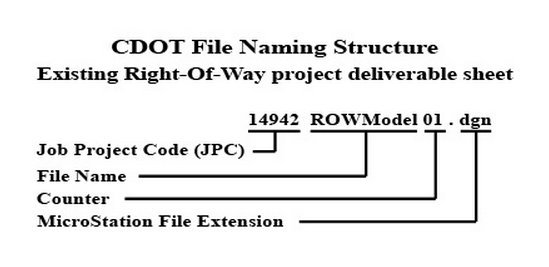

Although file-naming conventions do not have to be discussed in a DMP, it is a key part of data management planning in your local context. When naming your files, think about using descriptive labels that have meaning to others besides yourself, especially if these are data files to be shared with a team. Besides being descriptive, file names should follow a pattern. For example, when including a date and/or year, make sure it follows a pattern like YYYYMMDD. Think about coming up with models for file names - e.g.: project-name_content-of-file_date.file-format. File names should also reflect the version of the file. Versioning helps track the history and progress of data collection and is crucial to collaboration when more than one person needs access to a data file at any given time.
Other file-naming tips:
- Do not use spaces in file names
- Do not use uncommon characters (e.g., #, ?, &, !, etc.)
- Stay within a limit of 32 characters (the more concise yet descriptive, the better)
2.4 Summary
In this part, you learned the meaning of "metadata" and its important role in the documentation of data. In the DMP, in addition to noting types and formats the data will take, consider providing examples of the information you will capture about your data (e.g., information about location, instrumentation, rights and access, etc.). Consult resources such as the Digital Curation Centre's disciplinary standards list [12] to find out what standards for describing data your research community follows.
One common metadata schema that is discipline agnostic is the Dublin Core metadata element set. It's strongly advised to consult a metadata librarian, who can assist you in data description. A metadata librarian can also provide guidance on approaches to recording metadata, such as how to name files. A detail such as file naming convention is not necessary to include in a DMP, but you and your project team should decide as early as possible what conventions the team will follow for naming files.
Another resource worthwhile checking out are data repository indexes, such as DataBib [7], which you can use to find a repository suitable for your data when your project is ready to deposit them. Seeking out an appropriate repository ahead of time and learning about its requirements can inform how you describe your data.

Check Your Understanding
You are collecting survey data and have a field in your data set for geographic location. Some of your responses include both city and state; others include only the country; some did not respond at all. You've developed a codebook to describe how you've chosen to record this and other data from your survey. Is it appropriate to include the codebook in your metadata?
(a) Yes
(b) No
 Click for answer.
ANSWER: (a) Yes. Codebooks are considered part of the metadata, since they document and describe aspects of the data you have collected. Without a codebook, users of your data, such as other researchers, will not be able to understand your data readily, or at all, making reuse of the data and the ability to build on it highly unlikely. So, if you have developed a codebook as part of documenting your research data, then by all means include it as part of the metadata for your data.