Lesson 1: Introduction and Overview of 3D Modeling and Virtual Reality
Overview
Overview
This course brings into the classroom the ideas and developments that surround both 3D modeling and immersive technologies such as Virtual Reality (VR). The excitement is universal in academia (for over 30 years on and off) and the private sector (more recently) with the expectation of an 80 billion dollar industry by 2025 according to Goldman Sachs (reported on CNBC [1]). It is fair to assume that the geospatial sciences will never be the same once immersive technologies, everything from Augmented Reality (AR), Mixed Reality (MR), Augmented Virtuality (AV), to Virtual Reality, have moved into most people’s living rooms. In the following, we use the term xR or 3D/xR as a combination, to refer to a range of immersive technologies that are available.
Each of the topics that you will encounter in this course could (and is) easily be approached in individual courses! The point of this course is to give students an overview of current developments in 3D modeling and xR that we will keep up-to-date to the best of our abilities, but things are moving and developing fast. Students will encounter some hands-on experience with some of the most versatile and powerful tools for modeling and creating virtual realities such as SketchUp™, Unity3D™, or ArcGIS Pro (not in the residential version). Given the tremendous advancements in 3D modeling and xR that are currently taking place, the course is designed as a timely entry-level course with the goal to give students an understanding of the game-changing nature that recent developments will have for the geospatial sciences. This is an evolving course and any feedback you might have is greatly appreciated.
Learning Outcomes
By the end of this lesson, you should be able to:
- Define 3D modeling
- Define Virtual Reality (VR), Augmented Reality (AR), Mixed Reality (MR), and Augmented Virtuality (AV) (in short: xR)
- Identify, describe, and classify opportunities for geospatial sciences that are not possible in 2D / on regular desktops
- Find examples of 360 videos
- Find examples of 3D models
- Explain the difference between models and videos
- Explain the differences between VR, AR, AV, and MR
- Detail how immersive technologies will change the geographical/spatial sciences
Lesson Roadmap
| To Read |
|
|---|---|
| To Do |
|
Questions?
If you have any questions, please post them to our "General and Technical Questions" discussion (not e-mail). I will check that discussion forum daily to respond. While you are there, feel free to post your own responses if you, too, are able to help out a classmate.
1.1 Distinguishing VR, AR, and MR Systems
1.1 Distinguishing VR, AR, and MR Systems
To give you an idea of current developments in the field of Virtual Reality, Augmented Reality, Augmented Virtuality, and Mixed Reality, we would like you to watch the following videos and think about and reflect on the core differences in the technologies they use.
The first video gives you a quick overview of a collaboration between Microsoft and NASA using Microsoft’s Hololens. Please do feel free to dive deeper into the diverse application scenarios that are envisioned for the Hololens and related products!
Video: Mixed-Reality Tech Brings Mars to Earth (1:40)
At NASA, we're excited to apply mixed-reality technologies to the challenges we're facing in space exploration. Through a collaboration with Microsoft, we're building applications to support engineers responsible for the design and assembly of spacecraft. Astronauts working on the International Space Station and scientists are now using our Mars tool, OnSight, in mission operations. OnSight is a powerful tool for our scientists and engineers to explore Mars, but because we always felt it shouldn't remain only within NASA, we've taken the core of OnSight and made an amazing experience that allows the public to explore the red planet. We call this new experience Destination: Mars.
Mars can be a lonely place, so we've added photo-real holographic captures of an astronaut and a member of the Curiosity rover team to be our guides on this journey. This gave us the opportunity to immortalize a hero.
Hi there, I'm Buzz Aldrin.
To help Buzz explain how we're doing science on Mars today is Curiosity rover driver Erisa Hines. Welcome to my office. We can put the public, the rover and Erisa together at the exact place where Curiosity made some it's most amazing discoveries. We're looking forward to opening the Destination: Mars exhibit at the Kennedy Space Center Visitor Complex in summer 2016. We can't wait to share this journey with the world.
Let's go to Mars!
The second video provides you with an overview of the next generation MR headsets. The new HoloLens 2 by Microsoft provides infinite possibilities for users to interact with high-quality holograms that can be in the form of animated models of objects, conversational agents, natural phenomena, etc. The term that Microsoft is using to characterize the HoloLens products is “mixed reality”. What do you think this actually means?
Video: HoloLens 2 AR Headset: On Stage Live Demonstration (10:59)
Today I get to show you something very special. It's something we've been looking forward to for many years. When we set out to build HoloLens 2, we wanted to create some things that you didn't need to learn how to use. You should just know it. And we call this, instinctual interaction. Let me show you. Now, as I mentioned the HoloLens is very comfortable, it fits just like a hat. And the only thing that's even more effortless is how I'm automatically signed in. With Windows Hello and RS syndication, the Hololens 2 is actually signing me in as I put on my device. Now, not only does the Hololens 2 recognize me, it also recognizes my hands. Look at this. Fully articulated hand tracking. And as I move my hands around, the Hololens is actually calibrating to my unique hand size. And of course, not only does the Hololens 2 recognize me and my hands, it also recognizes the world.
Welcome to my mixed reality home. This is the place where I have all the apps and content that I use every day. Let's check some of them out. Now, I've seen many people put on HoloLens for the first time and the first thing people do when they put on the device is they reach out their hands and try and touch the holograms. And now you can. Look at the way that the hologram is responding to my hand, almost inviting me to touch it. And, in fact, I can just grab this corner to resize it. Or I can rotate it or move it. That's right, we are touching holograms. This is an app I've got called spatial. Let me just put it right there. I've got another app here called vurfoiral view. It's a little big, so let me just use two hands here to make it smaller and then rotate it so you can see. There we go. And then let me put it down here near spatial. Maybe make it bit smaller. Yeah, that's nice.
Alright, now let's switch gears and talk about a different kind of application. I've got a browser over there but it's kind of far away and I don't really want to walk over there. So let me just call it over with my voice, "follow me". This is a browser that's running Microsoft Teams, which is a tool that we use back home to collaborate. Let me see what the team's been working on. Ok, it looks like they've got a surprise for me in the playground app. I just have to say the words, "show surprise". Alright, so let me just open up that Start menu here, and then place the app and then launch it.
So now we're actually exiting my mixed reality home and going into an immersive experience. But notice that that browser that I had, actually followed me in. Now, this can actually be really useful when you have things like emails or PDFs that you need to reference while you're doing your work. I don't really want it following me around though, while I'm showing you all this cool stuff. So let me just put it over here and then we'll get back to it later.
Welcome to the playground. We spent years exploring and refining interactions for HoloLens2 and the playground's just a tiny sampling of the many prototypes that we built, tested and learned from. Our approach was basically to try out as many things as we could and look for the things that stood out. So, for example, here I've got three sliders. Each of them is controlling this wind farm simulation, but each in a different way, using a different interaction technique. One of the things we tried is this touch slider here. So here I can just stick my finger in the slider and have it go to a particular value to control that wind speed there. It felt okay. We also tried this push slider. So this guy you kind of nudge from side to side, kind of like an abacus, which was interesting. Now the interaction that really took home the cake though, was this pinch slider. The way that works is you just pinch it and move it wherever you want. And what we found was that people really like that tactile sensation of their fingers touching as they grab and then release. And across the board, for all interactions, the audio and visual feedback as a grab, move, and then release, were all really critical for making this experience feel connected. Oh, this is just so satisfying. I can't wait for you all to try this out.
Alight, now let's move on to a different kind of control, buttons. How do you press buttons on HoloLens 2? Well, you just reach out and press them. Now, one interesting thing that we found about buttons was that the size of the buttons actually impacted the way that people interacted with them. So, for example, for the smaller ones, most people would use one or maybe two fingers. But for the larger ones, pretty much everyone used their entire hand. And this is kind of interesting when you think about it because these objects don't really weigh anything. They're just digital things. But despite that, people would treat them like real things, almost as if the bigger one had more weight. I just love the way these move and the sounds they play when I press them, it's great. Alright, how about something that uses all ten fingers. Well, to test that out, we built a piano. So here I can just play a chord or I can play the keys one at a time. [Music]
Alright, so where's that surprise that the team had for me? Oh, that's right, I had to say those words. Show surprise. Ooooh, look at that hummingbird over there, it's gorgeous. I wonder if it will fly to my hand. Yeah. Oh wow. This is beautiful. I just love the way that it's following my hand around. I've got to tell the team they've done a great job. And in fact, I don't even need to use my hands to do this because I can use my eyes and my voice. That's right HoloLens 2 has eye-tracking. So I could just look over to this browser here and look at the bottom of the screen to scroll it, and then send my message. Start dictation. The hummingbird looks great, exclamation mark. Send.
So this is what we mean by instinctual interaction. By combining our hands, our eyes, and our voice, HoloLens two works in a more human way.
Anand Agarawala: Today companies tackling the world's biggest problems are increasingly spread across the world. And the hololens lets us work together as if we were standing next to each other face-to-face. To show you how that works, let me just flip into spatial here with my HoloLens 2 and materialize the room. Hi Jinha!
Jinha Lee: Hi everyone, it's great to be here on stage holographically.
Anand: It's great to have you here Jinha. Can you tell everybody a little bit about what you're seeing?
Jinha: Sure. I can see your lifelike avatar which we generate in seconds from a 2D photo. And we can walk around the stage with spatial audio and use this whole space around us to collaborate as if we're all here together in the same room.
Anand: Cool. Now to show you how companies are using Spatial to transform the way they work, let's invite Sven Gerjets, CTO of the iconic toy brand Mattel onto the stage.
Sven: Hey guys, how awesome is this. So at Mattel, we're undergoing a massive digital transformation. It's touching all aspects of our business. This includes the way that we're using technology to design and to develop our products. Our classic brands like Barbie and Hot Wheels and Fisher-Price, they have diverse teams of designers, engineers, marketers, and manufacturers that are spread all over the world. They can now come together in a spacial project room, reducing the need to travel as much, to get everybody on the same page. When we're developing toys, like this Rescue Heroes Fire Truck here, we're able to pin up dynamic content on virtual walls, like this powerpoint for instance, or videos, or even concept art. Teams can now rapidly exchange ideas and create a shared understand you to find potential issues much earlier in the cycle. For instance, guys, take a look at this wheel clearance here.
Anand: Oh yeah, I can see that's gonna be a problem. So I can pull out my spatial phone app and write a quick note, and then just hit Send, and it becomes a digital sticky note, which I can just grab and stick right on to the fire truck so that we can have engineering revise this later.
Sven: We can also use spatial much earlier in our design process to ideate and generate inspiration. Okay, guys, let's come up with some ideas for a line of aquatic toys.
Anand: Yeah, how about sea turtles.
Sven: Oh, that's really cool. Let's try sharks.
Jinha: That's cool how about jellyfish?
Anand: So all we have to do is say the words and they're instantly visualized right before our eyes. You can even click into one of these bundles and they expand it to a full-blown internet search, complete with 3d models, images, and webpages. Jinha, why don't we click into just the images here so we can get some good inspiration for this new aquatic line.
Jinha: Mm-hmm, sure. Every object you see in spatial is physical and tactile. So you can scroll through or pick up images you like and toss them up on the wall with physics.
Anand: And we don't have to just stick with digital content, I can actually pull up these sketches I did on my phone last night using that same spatial app. I just pull up those photos and hit Send and they're instantly transformed into this digital environment.
Jinha: Nice drawings. It's so easy to fill up your room with ideas, so we built this tool to help you quickly organize all these ideas. So let me select all of these and let's make a grid. This goes to the wall.
Anand: Now this entire room we've created is a persistent digital object that anyone can access or contribute to at any time, whether they're using an AR or VR headset or even a PC or mobile phone.
Sven: So that's right, now we can have virtually rich visual rooms that we can keep up for the life of the product. That means no more tearing down war rooms all the time. So Spatial and HoloLens are helping us drive improvements in our digital design and development process changing the way we create new toys. By bringing people together from all over the world to collaborate in the same virtual room, we're overcoming a natural barrier to our collective success, that's people's desire for direct face-to-face interaction when building commitment and trust. We're so excited to see faster time-to-market and reduced need to travel, as well as the many other benefits that we're gonna unleash at Mattel, as we collaborate in mixed reality.
The third video is a nice way of showing experiences in VR by placing users in front of a green screen. This adds a bit more information than filming people who are experiencing VR and then communicating the experience through their reactions. You probably have seen plenty of those videos showing people of hesitating to walk over a virtual abyss they know physically does not exist, playing horror games, or experiencing a different body. The HTC Vive that is demoed in the video below, like the Oculus Rift, is a high-end head-mounted VR system that requires a relatively powerful computer.
Video: Virtual Reality - SteamVR featuring the HTC Vive (4:29)
Sound of a box opening
Background Conversations
Valve Headquarters, WA
That's very green.
Come on in. So we're going to show you some virtual reality today. You know it's really hard to show people what it's like to be in virtual reality without having them try it for themselves. Filming you in the green screen studio is just the best way we found to help everyone else understand what it's like to be in VR. Any questions?
Can I go first?
Laughing.
All right, go crazy!
Hi! Awe, you're so cute! Oh. Laughing. Oh, he's doing a little trick. Oh. Hey, I have a stick now. Come here. You want the stick? Go get it! Laughing. He actually gets it. Come on. Oh, you're so cute.
It makes you feel like you're pulling a string back.
Left, check left.
Ooooh. Oh yeah. Nice shot.
No way! Laughing.
Hh my goodness, these guys are so cool.
Look behind you Kyra.
Screaming. Laughing.
Order up.
Ohhh. Bacon.
Oh no.
Computer voice: Is that how you cook for your family. How human.
It's burned.
Eat those doughnuts, get 'em. Get those donuts.
I don't want to stand in the way of his ball.
A little bit more toward us. There you go.
Laughing. Yay!
No, the other way, the other way. The wheels are a little off-kilter.
Hold on, hold on, I'm gonna get really hunkered down here. A little bit of a torque issue.
Yeah. There you go.
Right into the black hole. Yay! Laughing. Clapping.
What?
Kelly, go into space?
No, I can't, the grids here.
The grid wall here has to stop you from walking into the couch, walking into the walls.
Oh, this is so cool. I can move all this stuff.
Oh, oh, oh.
Look at this thing.
Laughing.
You've gotta keep with the beat.
Wha. Wha.
Ohhh. That was good.
Can you see me?
Yes. Hold up some fingers, let me see if...five!
Oh no! Laughing.
Oh my God.
Use both of your guns Kelly.
Oh, we have a little fire. It even feels hot, I think. I'm pretty sure I feel it.
The fourth video is a potpourri of systems that are referred to as augmented reality. It is rumored that Apple will be focusing on augmented reality technologies and you may have played Pokemon Go. It is important to note that there is a difference between Mixed and Augmented reality. In the former, virtual elements are embedded in the real environment in such a way that they provide the illusion that they are part of the environment. This illusion is enforced through virtual elements abiding with the laws of physics that govern our reality (e.g. a virtual robot that can collide with a physical table). Augmented reality, on the other hand, does not necessarily follow this principle.
Video: Augmented Reality Demo (2:15) This video is not narrated, music only.
The last video demonstrated the concept of Augmented Virtuality. The concept of AV refers to the idea of augmenting the virtual experience with elements of reality. An example of this approach could be the user of 360 degrees images and videos in a VR experience.
Group Discussion: VR Concepts
We invite you now to reflect on the different technologies that have become available in the last couple of years and that you have seen in the three videos above.
- What are the defining characteristics of Virtual Reality, Mixed Reality, Augmented Virtuality, and Augmented Reality?
- Are they different and if so what is the main distinction, which one is most useful for the geospatial sciences?
- Which system will become a mass-produced product?
- What are the advantages and disadvantages?
Your Task
Please use the Lesson 1 Discussion (VR Concepts) to start a discussion about this topic using the questions above as a guide. Active participation is part of your grade for Lesson 1. In addition to making your own post, please make sure to comment on your peers' contributions as well.
Due Date
Your post is due Saturday to give your peers time to comment. All comments are due by Tuesday at 11:59 p.m.
1.2 VR Systems
Introduction
1.2 VR Systems
Introduction
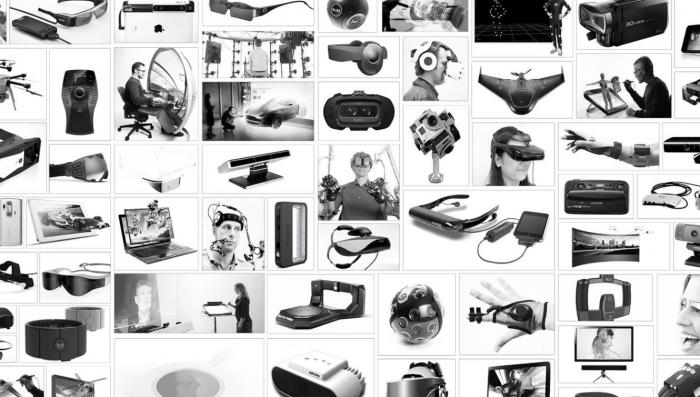
It is impossible to write a complete list of all the [A,M,V]R systems and content providers that are currently throwing their products on the market. Essentially, all major tech company and numerous startup companies are venturing into the field of VR. We are providing a short overview of some of the main systems that are available or are filling niche products. The image below provides a visual overview and a little farther down the line we have a quick memory game for you.
Oculus Rift
Oculus Rift
It is fair to say that the current hype around VR has been dramatically spurred by Oculus and the fact that a little startup company after only two years got purchased by Facebook for two billion dollars (see Mark Zuckerberg's announcement [3]) [4].
Oculus started with a then teenager, Palmer Luckey, who was building VR prototypes in his garage (are not all stories like this starting in garages)? Luckey sent one of his prototypes, the PR6 that he called the Rift, to famous game designer John Carmack (Doom, Quake, founder of id Software). Carmack a little later would demo the Rift at an E3 event where it created a lot of traction. Luckey teamed up with Brendan Iribe, Michael Antonov, and Nate Mitchell, and together they launched a Kickstarter Campaign, that raised not the anticipated $250K but over 2 million dollars (for more details see "How Palmer Luckey Created Oculus Rift [5]".
From there on it was a wild ride. The biggest change for the young company came when Facebook in 2014 bought it for two billion dollars. Had VR, even up until March 2014 created some hype and fantasies, at this point it had everyone’s attention.
After two developer versions, the consumer version started shipping in the Spring of 2016! Below is a figure that shows the transition from DK1 to the consumer version. The latter offers an OLED display, a resolution of 2160 x 1200, a 90 Hz refresh rate, a 110-degree field of view, and a tracking field of up to 5 x 11 feet. The Oculus Touch controllers have not yet been released. If you want to run an Oculus on your computer the recommended minimum specs are an NVIDIA GTX 970 / AMD 290 equivalent or greater, Intel i5-4590 equivalent or greater, 8GB+ RAM, Compatible HDMI 1.3 video output, 2x USB 3.0 ports, Windows 7 SP1 or newer.
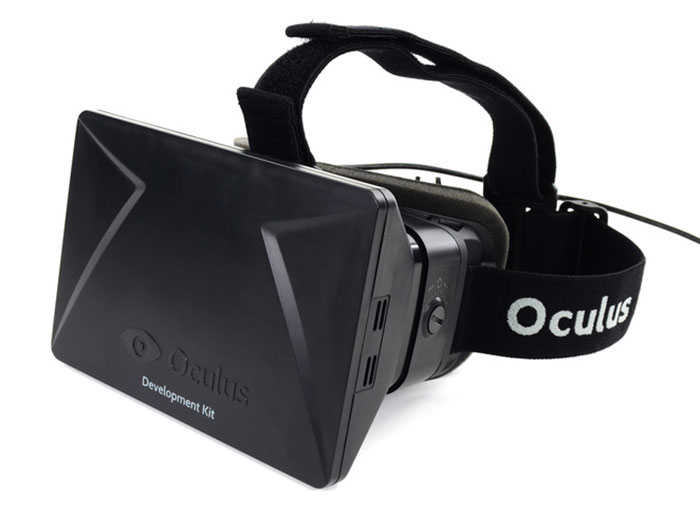
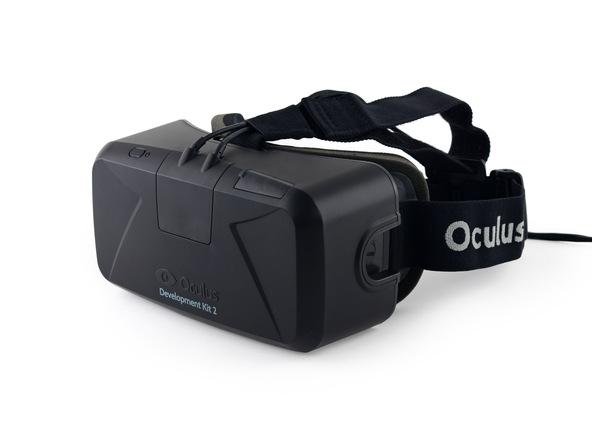
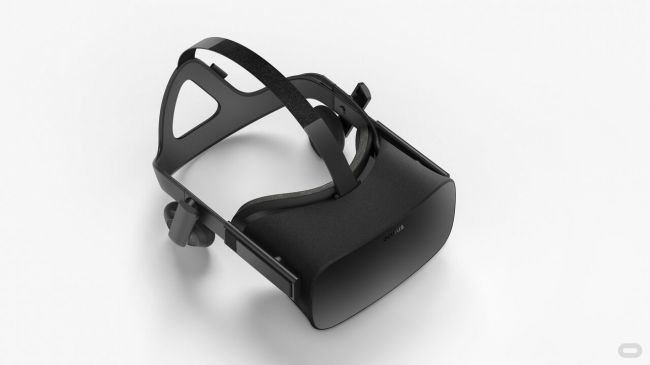
The latest versions of Oculus Rift can be used with either a remote controller or a more complicated
input modality such as Oculus Touch.
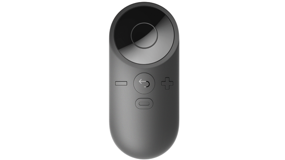
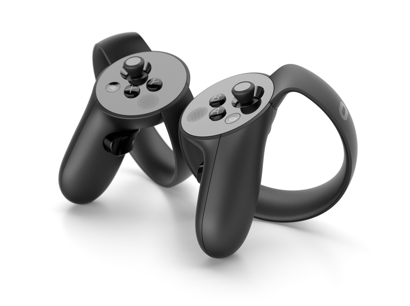
While the remote is rather limited as an interaction modality (only a few buttons), Oculus Touch provides a wide variety of interaction possibilities (e.g., finger tracking, gesture recognition) and a larger set of buttons on each controller.
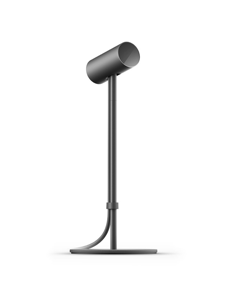
Moreover, by default two Oculus sensors are used to track and translate the movements of users (head movements based on the VR headset and hand movements based on the Touch controllers) in VR. This technology provides a 6-DOF (degrees of freedom) (3-axis rotational tracking + 3-axis positional tracking) tracking.
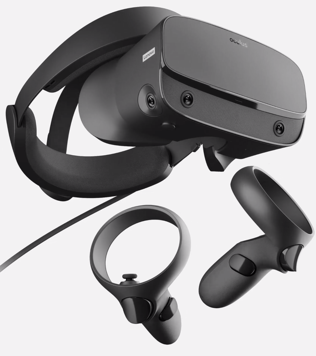
On March 20th, 2019 Oculus announced a new model to the Rift family called Oculus Rift S. The new member of the Rift family uses a Fast-switch LCD display with a resolution of 2560×1440 (1280×1440 per eye) with a refresh rate of 80 Hz. It utilizes a new technology called “inside-out tracking” using five cameras embedded into the headset, which eliminates the need for external sensors for tracking while maintaining a 6-DOF tracking. In short, the headset itself can track and translate the movements of itself and the controllers, which allows the users to freely move around a physical environment without restrictions. If you want to use an Oculus Rift S on your computer the recommended specs are an NVIDIA GTX 1060 / AMD Radeon RX 480 or greater graphics card, Intel i5-4590 / AMD Ryzen 5 1500X or greater, 8GB+ RAM, DisplayPortTM 1.2 / Mini DisplayPort, 1x USB 3.0 ports, and Windows 10.
Since the emergence of cost-effective VR HMDs developers and users have always been restricted to limited mobility options due to the requirements for these HMDs to be connected to powerful computers via cables (i.e. tethered).
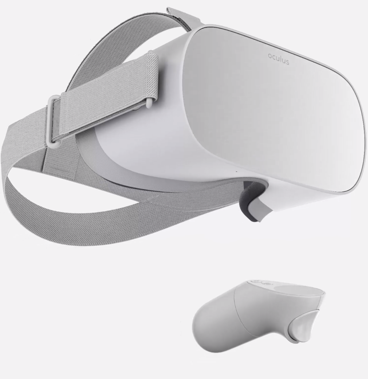
On October 11th, 2017 a new generation of Oculus HDMs called “Oculus Go” was announced and later on May 1st, 2018 released to the public. Go is described as an untethered all-in-one headset meaning that it can function as an independent device without the need to be connected to a computer. Evidently, the first generation of these untethered all-in-one headsets was not as powerful as their predecessors in terms of computing power. Oculus Go utilizes a Snapdragon 821 SoC processor and is powered by a 2600 mAh battery, 5.5" fast-switching LCD with a resolution of 2560×1440 (1280×1440 per eye) and refresh rate of 72 Hz, Adreno 530 internal graphics card, with non-positional 3-DOF tracking due to the lack of sensor use. Unlike the Rift, Go does not use rich controllers such as “Touch” but instead, uses a simple remote controller with limits interaction possibilities. On December 4th of 2020, Oculus discontinued the Go HMD and officially replaced it with the next generation, Quest.
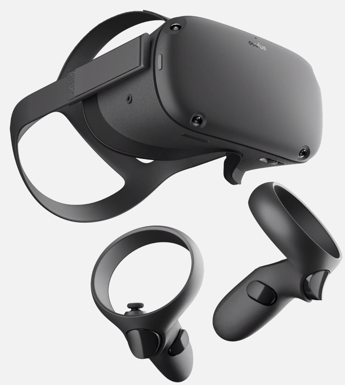
On May 21th, 2019, Oculus released a new breed of untethered all-in-one headsets called Oculus Quest. This HMD brings the best features of Rift and Go together in one. Similar to Go, it is an all-in-one standalone headset, and similar to the Rift it uses inside-out-tracking with 6-DOF. Furthermore, it utilizes a more powerful GPU and processor (4 Kryo 280 Gold processor with 4GB RAM, and an Adreno 540 graphics card), capable of running high-quality applications. It has a PenTile OLED display with a resolution of 1440 × 1600 per eye, and a refresh rate of 72 Hz. Furthermore, unlike the other untethered Oculus product Go, Quest uses the latest version of touch controllers.
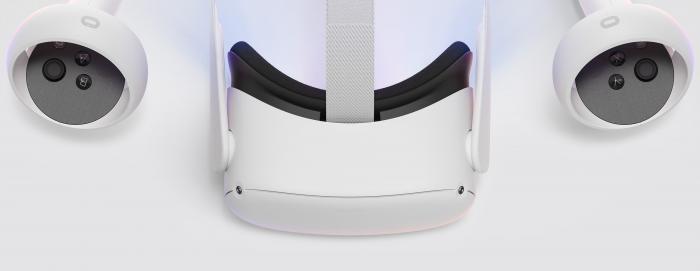
On October 13th, 2020, Oculus released the new generation of Quest, called Quest 2. This new generation of the Quest HMD has superior specifications in the processor (Qualcomm Snapdragon XR2), RAM (6 GB), and display resolution (1832 x 1920 per eye) and starts at a very competitive price of $299.
HTC Vive
HTC Vive
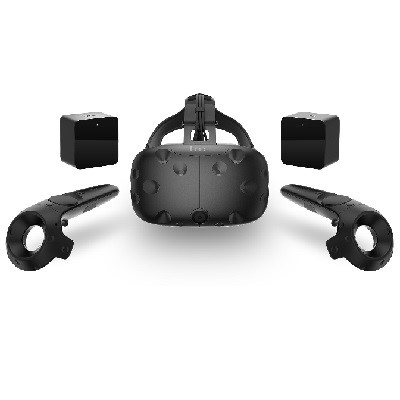
The HTC Vive is a collaboration project of software company Valve and tech giant HTC. Not going into any details of how they came together, the Vive is a truly awesome product that offers substantial flexibility and sophisticated interaction opportunities. The main difference to the Rift is that it does not require users to remain in front of a computer screen (or a fixed location). The Vive comes with room sensors that allow users in small spaces to actively move around (you saw the intro VR video [7]), which is awesome. Additionally, the controllers allow for tracking locations of hands, provide advanced interactivity, and provide haptic feedback in the form of vibrations.
It is always very difficult to explain experiences one has in a VR environment like the Vive to someone via text … one of the best solutions without actually experiencing it oneself is this video filmed using a green background (see intro video [8] again).
The Vive also has a 2160 x 1200 resolution, offers a 90 Hz refresh rate, and a 110-degree field of view. In contrast to the Rift, the tracking field is 15 x 15 feet. The minimum computing requirements are similar to the Rift: NVIDIA GeForce GTX 970 /Radeon R9 280 equivalent or greater, Intel Core i5-4590 equivalent or greater, 4GB+ of RAM, Compatible HDMI 1.3 video output, 1x USB 2.0 port.
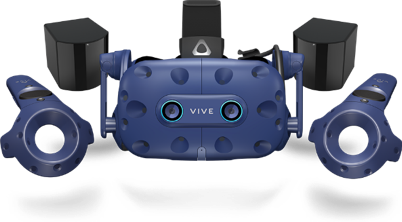
On January 8th, 2018, HTC released an updated version of Vive called Vive Pro. The new HMD has a higher resolution at 1440 x 1600 resolution per eye and a refresh rate of 90 Hz. Thanks to its sophisticated tracking sensors (called lighthouses) Vive provides up to 22’11” X 22’11” room-scale tracking of headset and controllers. Vive Pro is also equipped with two cameras embedded into the headset, facing outward. These cameras can be used to bring the real world into VR (Sounds similar to a type of xR previously discussed?). Moreover, Vive affords multi-user interaction in the same physical space. Notwithstanding, each user requires their own dedicated computer and play-area.
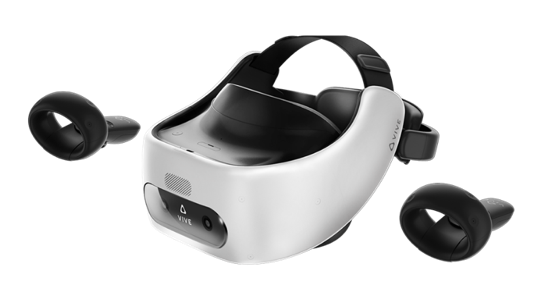
In November 2018, VIVE released their first untethered all-in-one headsets called Vive Focus. The focus utilizes inside-out-tracking technology and affords 6-DOF tracking. It has a 3K AMOLED display, with a resolution of 2880 x 1600 and a refresh rate of 75 Hz, and a Qualcomm Snapdragon™ 835 processor and two controllers.
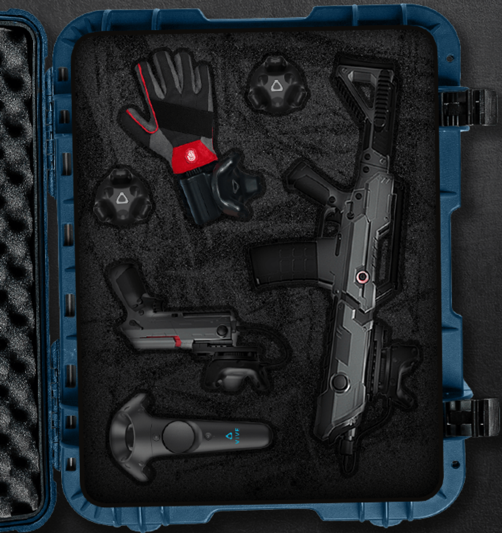
In addition to awesome and popular HMDs, VIVE also provides a variety of external sensors and controllers that can be used to create a much richer and close-to-reality VR experiences. These include trackers that can be attached to arms and legs to provide a feeling of embodiment of users in VR (tracking and projecting the hand and leg movements of users in VR), controllers that look like weapons, and VR gloves that cater for hand and finger actions in VR while providing haptic feedback to users.
Other HMDs
Other HMDs
There are numerous other HMD brands such as Samsung GearVR, Nintendo Lab VR kit, Sony PlayStation VR, Lenovo Mirage, etc. with different specifications. Going into details about each and every one of these different brands would be out of the scope of this lecture. Notwithstanding, it would be of great interest to become familiar with some of the HMDs are go beyond the conventional specifications.
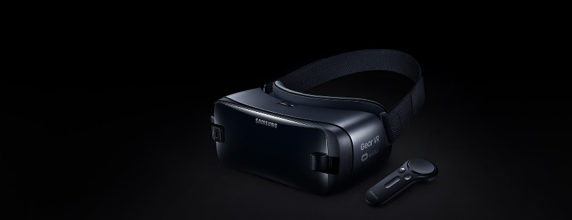
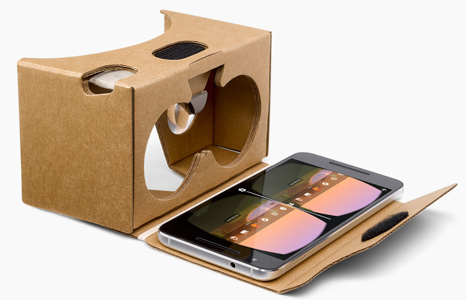
Although not new, Samsung’s GearVR is of the most affordable (but limited) HMDs. Instead of requiring the user to purchase his or her own computer, it works with various Samsung Galaxy phones. You can think of it as a fancier version of the Google Cardboard viewer. While the Cardboard viewer essentially works with every smartphone, the GearVR requires a Samsung phone although in its newest release the GearVR accepts a range of Samsung phones. While the Cardboard viewer is somewhat limited in its interactive capabilities (gaze and the little magnet button on the side), the GearVR has a back button and a little trackpad on the side. Computing power and display characteristics will depend on your phone.
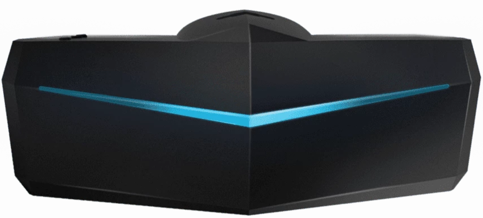
While most VR HDMs have a field of view (FOV) of around 110 degrees, Pimax is an HMD with a FOV of 170-200 degrees (close to human vision). It has an 8K resolution (3840 x 2160 per eye) with a refresh rate of 80 Hz and is tethered. In addition to being compatible with a variety of controllers (e.g. HTC Vive controllers), Pimax has a special Leap Motion [12] module embedded in the HMD. This module provides real-time and accurate hand tracking and can enable users to solely use their hands as the interaction modality. Furthermore, as another addition to its modular system, Pimax utilizes an eye-tracking module that can provide real-time tracking of users’ eye movements while interacting with a VR experience. Such information will be useful for an array of research topics, including usability studies, user-behavior analysis, and learning content adaptation. The high FOV provided by Pimax enable users to perceive the virtual environment in a way much closer to real life. This can potentially set the basis for more effective training of visual-spatial skills in VR and a more successful transfer of these skills to real-world contexts.
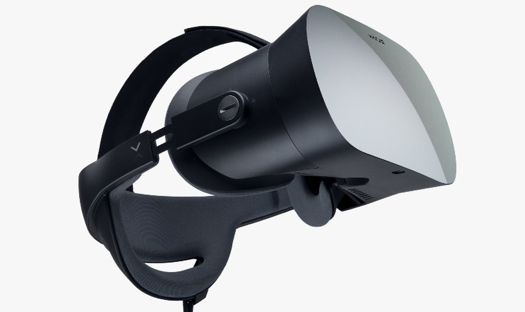
As is evident from the different HMDs we have seen so far, the resolution of these devices has improved significantly over the past few years. Notwithstanding, they are still not comparable to high-end desktop experiences in that respect. As one of the main applications of VR HMDs is training via realistic simulations, display quality and high-resolution imagery can play a determining role in the successful realization of learning goals in these applications. For this exact reason, the Varjo company has released a VR HMD called Varjo VR-1. Standing at almost 6000$, it is one of the most expensive HMDs in the market, but it possesses unique characteristics. It has a Bionic display – human eye-like resolution of 60 Pxl per degree and combines a 1920x1080 low-persistence micro-OLED and a 1440x1600 low-persistence AMOLED. It is important to note that this HDM is not targeted at average consumers, but rather for AEC (architecture, engineering, and construction), industrial design, virtual production, healthcare, and training and simulation. Given the fact that resolution is one of the drawbacks of VR which impedes its proper utilization in simulations and application where detailed graphical elements are important (e.g. creation of artwork in VR, reading long texts in VR, surgery simulation, interacting with a cockpit panel with lots of buttons and small labels, etc.), this HDM opens the door for interesting research opportunities. Furthermore, it has a built-in eye-tracking module that provides researchers with a great opportunity to monitor the behavior of users when interacting with a VR experience for the purposes of usability studies, measurements of attention/interest, user behavior studies, and content adaptation.
The bottom line is that there is a tremendous amount of development on the VR market that is spurring developments in industry and academia. We just gave you a little glimpse of some of the most prominent examples but there are many, many more. To further acquaint you with some of the technologies we have two tasks outlined on the next page.
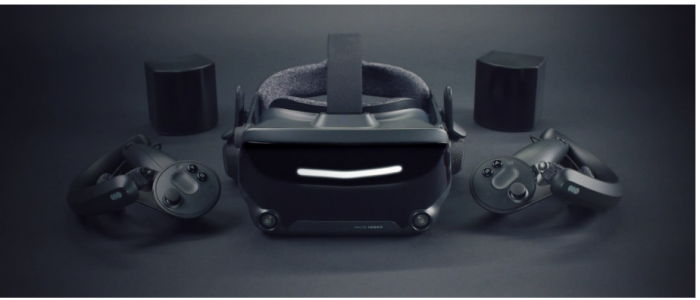
On June 28th, 2019, Valve released the first of their second-generation HMDs called Index. Valve Index has a display resolution of 1440 x 1600 per eye and a refresh rate of 120 Hz. Valve index is backward compatible with all HTC products including the Vive HMDs and the lighthouses (base stations used for tracking). It comes with a new generation of the lighthouse sensors (base station 2.0) that offer improved tracking range, better field of view, and potentially a 300 percent larger tracking space. Perhaps one of the most delightful features of the Valve Index is the novel controllers (called Knuckles) that are significantly more ergonomic compared to other controllers on the market.
Test Your Knowledge
This is an ungraded assignment to test your knowledge.
Assignment
Graded Assignment (Product Review)
Find a product related to [A,M,V]R, not covered in this section that you are excited about. Write a one to two paragraph description, add a picture and submit your response to the Lesson 1 assignment.
Due Date
Please upload your assignment by 11:59 p.m. on Tuesday.
Guidelines and Grading Rubric
- The product needs to be different from the ones discussed above.
- The write up should contain some technical specifications.
- The image, ideally, does not have copyright issues (e.g., use press release kits, wiki commons, Flickr, etc.) and you provide proper source information.
- Writing should clearly communicate your excitement about the product, should be grammatically correct and without typos.
| Criteria | Full Credit | Half Credit | No Credit | Possible Points |
|---|---|---|---|---|
| Product described is different from course examples. | 2 pts | 1 pts | 0 pts | 2 pts |
| Image provided is not copyrighted. | 1 pts | .5 pts | 0 pts | 1 pts |
| Write up is well thought out, researched, organized, contains some technical specifications, and clearly communicates excitement. | 3 pts | 1.5 pts | 0 pts | 3 pts |
| The document is grammatically correct, typo-free and cited where necessary. | 1 pts | .5 pts | 0 pts | 1 pts |
|
Total Points: 7 |
1.3 3D Modeling and VR in the Geospatial Sciences
1.3 3D Modeling and VR in the Geospatial Sciences
"At the time of writing, virtual reality in the civilian domain is a rudimentary technology, as anyone who has work a pair of eyephones will attest that the technology is advancing rapidly is perhaps less interesting than the fact that nearly all commentators discuss it as if it was a fully realized technology. There is a desire for virtual reality in our culture that on can quite fairly characterize as a yearning." (Penny, 1993: 18; in Gillings, 2002)
The Geospatial Sciences have an intricate relation to 3D modeling and VR. While representations of our
environments have been largely in 2D, that is, maps in the past centuries, there also have been efforts to make 3D information part of the geospatial toolset. This does not come as a surprise if we look outside the USA where GIScience is often part of Geomatics (surveying) departments, for example, in Canada and Australia. Interest in VR and 3D modeling has always come in waves so far, that is, people got interested and excited about the prospects of having 3D models and virtual access to these models (see quote by Penny above), started implementing systems and theorizing about the potential, and then gave up as they ran into too many obstacles. Looking into one such effort, a workshop and subsequent book project led by Peter Fisher and David Unwin (2002) summarized the state of the art in geography more than a decade ago and identified prospects and challenges of using VR:
- Ergonomic issues such as feeling disorientated and nauseous also referred to as motion or cybersickness.
- Substantial costs for everyone who wants to use a VR system.
- A rather complex technology for getting content to users in comparison with other media such as the World Wide Web.
If we look at these problems from today’s perspective, we can confidently assert that most of these problems have been resolved (if not all of them). Motion sickness is largely taken care of by advancements in computing technology, that is, better sensor technology and higher framerates allow for almost perfect synchronization of proprioceptive and visual senses reducing or eliminating motion sickness. And, if anything, this is a development that will get even better in the near future as graphics card manufacturers such as NVIDIA or AMD are now developing new products for a growing market, not just a niche. Check out the specs of the new NVIDIA GTX 1080 in comparison to older models GEFORCE [16]. Some problems still persist. It is still not the case that everyone feels comfortable in a VR environment and some people still get motion sick; unfortunately, it is worse if you are old or not getting enough VR time. However, we are getting very close to weed out ergonomics issues that have been standing in the way of mass deployment of VR.
As you see with the Cardboard version of a VR experience, the one that we have sent you, it is possible to get content into people’s hands rather easily. All you need is a smartphone and some apps. This still does not include high-end applications such as Oculus Rift or HTC Vive as they require hardware as well as a beefy gaming computer, but with the advancements in computing power and the availability of low-cost VR ready system, it is only a matter of time until essentially everyone will be able to access a VR (or AR or MR) system.
Likewise, the issue of VR being a rather complex technology does certainly not stand in the way any longer. While VR and 3D modeling are still requiring some training for people who would like to dive deep into software and content development, creating a simple VR experience is as easy as pressing a button. The intro video that you can find on the introductory page is created using a Ricoh™ Theta S, a 360-degree camera that can be purchased via Amazon™ for about $350. During the development of the course, the software app that comes with this camera has drastically improved and allows now for watching videos in the viewer and has a direct upload to YouTube (rather than having to infuse 360-degree videos with additional information, which was the case in May 2016).
So what is remaining as a challenge for VR to become omnipresent in the geospatial sciences and to enter the mass market? Interestingly, in a recent survey, the lack of content has been identified as one of the main remaining obstacles (Perkins Coie LLP & UploadVR Inc., 2016). This is, in my humble
opinion, one of the biggest opportunities for the geospatial sciences. With a long-standing interest in organization information about the world in databases, scanning and sensing the environment, and, more recently modeling efficiently in 3D with geospatial specific approaches and technologies, geospatial is potentially playing a critical role in the developing VR market, and benefitting from it in return. We shall see whether this prediction holds.
For a long time, people have been building 3D models not in the computer but by using physical miniature versions of buildings. The Figure below shows a nice example of the 1630 city of Göttingen, Germany. To get an idea of the current status quo of 3D modeling from a GIS perspective we would like you to read a white paper published by Esri in 2014. Please be advised that there will be questions in quizzes and the final exam on the content of the white paper.
Download paper linked below
3D Urban Mapping: From Pretty Pictures to 3D GIS (An Esri White Paper, December 2014) [2]

References
Fisher, P. F., & Unwin, D. (Eds.). (2002). Virtual reality in geography. London, New York: Taylor & Francis.
Gillings, M. (2002). Virtual archaeologies and the hyper-real. In P. F. Fisher & D. Unwin (Eds.), Virtual reality in geography (pp. 17–34). London, New York: Taylor & Francis.
Penny, S. (1993). Virtual bodybuilding. Media Information Australia, 69, 17–22.
Perkins Coie LLP & UploadVR Inc. (2016). 2016 Augmented and Virtual Reality Survey Report. Retrieved from https://dpntax5jbd3l.cloudfront.net/images/content/1/5/v2/158662/2016-VR... [18]
1.4 Applications of 3D Modeling
1.4 Applications of 3D Modeling
3D modeling was expensive in the past. With the availability of efficient 3D workflows and technologies that either sense the environment directly (such as LiDAR and photogrammetry) or use environmental information to create 3D models (such as Esri CityEngine's procedural modeling, see Lesson 2 and 4) it is now possible to properly use 3D models across academic disciplines. While there is still an ongoing debate to which extend 3D is superior to 2D from a spatial thinking perspective and there is, indeed, beauty in abstracting information to reveal what is essential (see London subway map [19]), there is also, without a doubt, a plethora of tasks that greatly benefit from using 3D information. For example, whether or not you are gifted with high spatial abilities, inferring 3D information from 2D representations is challenging. Below is a quick collection of topics and fields that benefit from 3D modeling and analysis (see also Biljeki et al. 2015):
- Estimation of shaded areas to calculate reduced growth areas for agricultural planning.
- Estimation of solar irradiation.
- Energy demand estimation.
- Urban planning.
- Visualization for navigation.
- Forest management.
- Archeology.
- Visibility analysis.
- Identifying sniper hazards.
- Orientation and wayfinding.
- Surveillance camera positioning.
- Noise propagation in urban environments.
- Flooding.
- Cultural Heritage.
- Communicating Climate Change.
References
Group Discussion (Application of 3D Modeling)
Can you think of additional areas of application of 3D modeling not mentioned above?
The Task
Use the Lesson 1 Discussion (Application of 3D Modeling) to suggest and discuss further applications.
Due Dates
Please post your response by Saturday to give your peers time to comment by Tuesday.
1.5 Important VR Concepts
Introduction
1.5 Important VR Concepts
Introduction
Complementing developments in 3D modeling it is fair to say that we are entering the age of immersive technologies. There are, unsurprisingly, many concepts that characterize VR systems. Scientist think about them to describe systems and interactions on the basis of specific characteristics rather than on the basis of brands. One could ask is the Rift superior to the Vive, or, alternatively one could ask whether it makes a difference that people have more than twice as much space to move around, the Vive allows people to turn a room into a VR experience while the Rift is spatially more restrictive (although this may change). Other such characteristics that potentially make a difference are the field of view, the resolution of the display, or the level of realism of the 3D models.
We will discuss here three concepts, immersion, presence, and interaction that have received considerable attention in the study of VR.
Immersion, Presence, and Interaction
Immersion, Presence, and Interaction
We have already discussed that the renewed interest in virtual technology, the fidelity, and overall quality of information presented in virtual environments are vastly improving. These improvements are not only propelling VR technologies into living rooms and research facilities, but they also have the potential to impact on spatial experiences that users have with virtual environments from the inside of a volcano to the Mayan ruins to informal settlements in Rio. In several studies, it has been shown that these spatial experiences may have positive influences on knowledge development and transfer to a real-world application (Choi & Hannafin, 1995). In other words, by enhancing one’s intensity of the experience, it may offer a way to facilitate learning through understanding and engagement. The literature on spatial experiences within virtual environments, however, is full of ambiguous concepts centered around the relationship between presence, immersion, and interactivity. In bringing conceptual clarity to distinguish these concepts, knowledge derived from previous research can become easier to implement and evaluate. This knowledge can then help to clarify the importance of spatial experiences for systems that enable experiences that only virtual environments can offer. We start the discussion by distinguishing between presence and immersion, defining dimensions of presence, and examining knowledge built from spatial experiences.
How difficult it is to characterize these concepts should become apparent when you try to define, for example, immersion, yourself. The problem with most scientific concepts is the term we use to describe a concept often also has meaning in everyday language (mathematicians get out of this mess by using symbols, e.g., π, and then define what it means). When we think of immersion we have a couple of options defining its meaning. When my kids watch their 20 minute TV show every other evening (Masha and the Bear for the 2-year-old, Word Girl for the 5-year-old), I experience the power of immersion first hand. I would describe their state as being glued to the TV and if unresponsiveness is a measure for immersion than I could make an argument that we really do not need VR. Everyone probably has made similar experiences reading a book whether It or Harry Potter that has taken you under their spell. In becoming engaged with the media, you start to feel a part of the story, feeling present in the space.
Yet, from a technology perspective immersion can be defined differently. For example, in the work by Slater (1999), immersion is distinguished from presence with the former indicating a physical characteristic of the medium itself for the different senses involved. Furthermore, according to Witmer and Singer (1998) immersion is defined as “a psychological state characterized by perceiving oneself to be enveloped by, included in, and interacting with an environment that provides a continuous stream of stimuli and experiences” (ibid, page 227). Witmer and Singer have also argued that immersion is a prerequisite for experiencing presence.
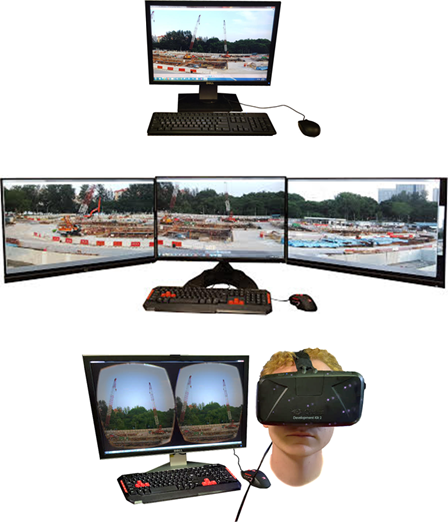
To give you a simple example of immersion, the figure below shows three setups that we used in a recent study on how different levels of immersion influence the feeling of being present (more below) in a remote meeting. We compared a standard desktop setting (the lowest level of immersion) with a three-monitor set up (medium level of immersion) against using an immersive headset (here the Oculus Rift). You can order these technologies as we have just done along a spectrum of immersiveness which then helps to design, for example, experiments to test whether or not being physically immersed has an effect, for example, on the subjective feeling of team membership. Imagine that instead, you are using Skype (or zoom, or any other video conferencing tool) but instead of staring at your single monitor, the other person is streaming a 360-degree video directly into your VR HMD.
In contrast, the nature of presence in and of itself is highly subjective, making it hard to distinguish from concepts like immersion (well, we just did). The sense of presence is indeed the subjective sense of being in the virtual environment (Bulu, 2012). Many smart people have thought about this and to make things more fun have developed further distinctions such as spatial presence, co-presence, and telepresence. Sense of presence seems to be, interestingly enough, related to immersion and several studies have shown that immersive capabilities of technology, specifically VR technology, impact the subjective feeling of presence (Balakrishnan & Sundar, 2011). Therefore, different configurations of technology to increase immersive capabilities should increase the sense of presence experienced by a user (well, it is a plausible hypothesis).
The relationship between immersion and presence forms at the point when user attention is focused (or absorbed) enough to allow for involvement in the content to become engaged with the digital environment (Oprean, 2014). This relationship allows for a clear distinction between immersion and presence while enabling a framework for measuring the influence of one on the other. On similar grounds, and as was previously mentioned, Witmer and Singer (1988) argue that both immersion and involvement are prerequisites for experiencing presence in a virtual environment. Involvement from their perspective is defined as “a psychological state experienced as a consequence of focusing one's energy and attention on a coherent set of stimuli or meaningfully related activities and events” (ibid, page 227), and also related to other concepts similar to engagement such as the “flow state” introduced by Csikszentmihalyi (1992).
Presence is a large and heavily measured construct in research on spatial experiences. The construct of presence consists of a number of dimensions specific to different contextual purposes: spatial, co-, tele-, social, etc. Each dimension of presence is considered with the same foundational meaning: that a user feels ‘present’ within a given medium, perceiving the virtual content (Steuer, 1992). The different dimensions, however, help to further distinguish the context or situation in which presence occurs.
The dimensions of presence cover a range of contextually different concepts that are often used interchangeably (Zhao, 2003). Telepresence distinguishes itself through its original context, teleoperation work (Sheridan, 1992). Steuer (1992) defines telepresence as distinguishable from presence by suggesting it refers to the experience of a secondary, such as virtual, environment through a communication medium. Taking both of these distinctions into account, telepresence, as related to its context of teleoperation, suggests that perceptions relate to experiencing a virtual environment in which work (i.e., interaction) can occur through a communication medium. This definition relates to the development occurring in collaboration research with telepresence systems; systems meant to mediate a sense of presence to enable work on tasks, individually or collectively.
Co-presence is similar, yet a different dimension of presence, than telepresence. Nowak and Biocca (2003) note the distinctions between telepresence and co-presence as pertaining to connection with others. Whereas telepresence can occur without other individual’s involvement, co-presence is dependent on another human being present to connect with through a communication medium. This human connection is what distinguishes co-presence from telepresence, a focus on a human-human relation (Zhao, 2003).
Social presence, another dimension of presence, has a similar definition to co-presence but requires a group of humans to connect with (Nowak & Biocca, 2003). Gunawardena and Zittle (1997) further the definition of social presence stating it is the degree of perceived realness of a person in a mediated communication. This perception of realness is dependent on two concepts: intimacy and immediacy (Gunawardena & Zittle, 1997).
Spatial presence builds on the foundational definition of presence, the feeling of being in an environment. Steuer (1992) notes that with any mediated communication there is overlap with the physical (real world) presence. Spatial presence there relates to the believability of being present within the mediated space, making spatial presence purely experiential.
In distinguishing the dimensions of presence, it becomes easier to establish factors which impact the level at which a user’s perception of being a part of a mediate space. In particular, such a distinction is necessary to understand the true implications of telepresence systems and how the initial sense of being a part of a mediated space impacts teamwork.
Interaction, in contrast, seems to be somewhat more straight forward and less troublesome to define than the concepts of immersion and presence. However, like with most things, once you dig deeper into it you will find that it is not so straight forward after all to make distinctions, especially when more than one modality is involved. Interaction can be broken down into dimensions such as navigation (whether an environment is navigable or not), does the interface allow for interaction and which modality is involved (gaze used often in cardboard environments versus haptic gloves), and human agency, which could relate to navigability but it also could be a measure of how much a user is able to interact with and/or manipulate a particular environment.
Instead of trying to further define these concepts we ask you to have a look at the Figure below. Most concepts we discussed can be arranged on a spectrum from high to low (especially immersion and interactivity). This distinction is useful when we think about different VR technologies.
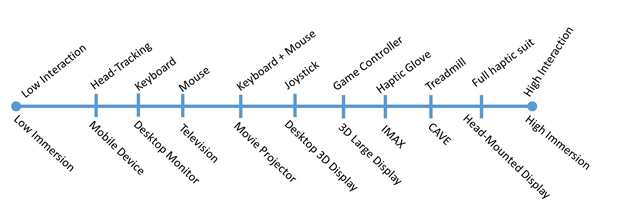
To summarize, this section provided a glimpse into the more academic discussion of how to conceptualize virtual reality. We briefly discussed important concepts such as immersion, presence, and interactivity and showed exemplarily how everyday use of the terms may interfere with their more academic definitions (although even academics get lots in these discussions). Distinguishing VR technologies along the dimensions of these concepts, for example, from high to low levels of immersion, is useful to a) talk about categories of technology rather than individual products; b) to start investigations of which technology might actually help in communicating or making decisions about space and place in the past, present, and future.
References
Balakrishnan, B., & Sundar, S. (2011). Where am I? How can I get there? Impact of navigability and narrative transportation on spatial presence. Human-Computer Interaction, 26(3), 161-204.
Bulu, S. T. (2012). Place presence, social presence, co-presence, and satisfaction in virtual worlds. Computers & Education, vol. 58, no. 1, pp. 154–161.
Csikszentmihalyi, M. & Csikszentmihalyi, I. S. (1992). Optimal experience: Psychological studies of flow in consciousness, Cambridge university press.
Choi, J. I., & Hannafin, M. (1995). Situated cognition and learning environments: Roles, structures, and implications for design. Educational technology research and development, 43(2), 53-69.
Gunawardena, C. N., & Zittle, F. J. (1997). Social presence as a predictor of satisfaction within a computer‐mediated conferencing environment. American journal of distance education, 11(3), 8-26.
Nowak, K. L., & Biocca, F. (2003). The effect of the agency and anthropomorphism on users' sense of telepresence, copresence, and social presence in virtual environments.Presence: Teleoperators & Virtual Environments, 12(5), 481-494. doi:10.1162/105474603322761289.
Oprean, D. (2014). Understanding the immersive experience: Examining the influence of visual immersiveness and interactivity on spatial experiences and understanding. Unpublished doctoral dissertation, University of Missouri.
Sheridan, T. B. (1992). Musings on telepresence and virtual presence.Presence: Teleoperators & Virtual Environments, 1(1), 120-126.
Slater, M. (1999). Measuring presence: A response to the Witmer and Singer presence questionnaire. Presence: Teleoperators and Virtual Environments,8(5), 560-565.
Steuer, J. (1992). Defining virtual reality: Dimensions determining telepresence. Journal of communication, 42(4), 73-93.
Witmer, B. G. & Singer, M. J. (1998). Measuring presence in virtual environments: A presence questionnaire, Presence 7 (3), 225–240.
Zhao, S. (2003). Toward a taxonomy of copresence. Presence: Teleoperators and Virtual Environments, 12(5), 445-455.
1.6 Examples
1.6 Examples
There is an almost infinite number of examples of VR content that is pushed on the market with new and exciting opportunities being added on a daily basis. We have selected a couple that we are looking at in a little more detail.
Google Cardboard / WITHIN
We have sent you a Google Cardboard. It is actually a slightly more advanced version than the standard one and it does help to adjust the distance between the lenses. If you are using Google Cardboard, there are many, many options to choose from that offer you content from Google itself but also other VR companies such as Within. You are strongly encouraged to explore content on your own! As one of the assignments we would like to give you, please watch the 360° video offered by Within called Clouds over Sidra. You can watch it either in the Cardboard viewer, or, if you prefer or have not received your viewer yet, you can also watch it on your phone without the viewer, or through other VR headsets, or on your computer via the web. The video Clouds over Sidra has been embedded below for your convenience.
Video: WITHIN 360° Video, Clouds Over Sidra (8:35)
We walked for days crossing the desert into Jordan. The week we left, my kite got stuck in a tree in our yard. I wonder if it is still there. I want it back.
My name is Sidra. I am 12 years old. I am in the fifth grade. I am from Syria and the Daraa Province in (inaudible city name). I have lived here in the Zaatari camp in Jordan for the last year and a half. I have a big family, three brothers one is a baby, he cries a lot. I asked my father if I cried when I was a baby and he says I did not. I think I was a stronger baby than my brother. [Music] We like to keep our bags and books clean and without rips. It is like a game to see who has the nicest books with no folds in the pages. [Music] I like cloudy days. I feel like I am under air cover, like a blanket. Our teachers sometimes pick students who do not place their hands to answer. So everybody raises their hand even if they do not know the answer. But I do my homework and I know the answer if she calls on me. [Music] There is a bakery not far from school. The smell of bread on the walk to class drives us mad sometimes. [Music] Some kids don't go to school. They want to wait until we are back home in Syria. I think it is silly to wait. How will they remember anything? And there is nothing better to do here anyway. Computers give the boys something to do. [Music] They say they are playing games but I don't know what they're doing because they won't let girls play on the computers. I don't understand computer games [Music] or boys. Many of the men say they exercise because they want to be strong for the journey home. But I think they just like how they look in the mirror. A lot of them make funny sounds when they lift the weights. [Music] The younger boys are not allowed in the gym so they wrestle or they try to wrestle.[Music] Even after everything, boys still like to fight. [Music] We have to play football quickly because there are so many kids waiting to play, especially now. Unlike home, here in Zaatari girls can play football too. That makes us happy. [Music] My mother makes sure we are all together for dinner. I still love her food even if she doesn't have the spices she used to. [Music] [Applause] There are more kids in Zaatari than adults right now. Sometimes I think we are the ones in charge. [Music] [Music] I think being here for a year and a half has been long enough. [Music] I will not be 12 forever and I will not be in Zaatari forever. My teacher says the clouds moving over us also came here from Syria. Someday the clouds and me are going to turn around and go back home. [Music]
To watch this 360 video you can click on the video, visit WITHIN [21] or download and use the WITHIN app for a cardboard experience (recommended).
When watching the video, especially in the Cardboard / immersive headset option, take note on a couple of things:
- How does filming a 360° video change how you follow the storyline of the video. Take note of aspects of the video that may or may not be unintentional.
- What is the role that audio plays in watching the video and providing guidance on what to focus on (it is best to use headphones).
- What does being immersed add to the video, how do your attention and your connection to the place change?
- Did you try watching the video standing? I personally feel that it adds to my sense of place (and the camera was at a somewhat higher viewpoint).
- Anything else?
Google Expeditions
All major technology companies are investing heavily in 3D/VR technology. Google’s Expeditions Pioneer Program is one example. Expeditions is a professional virtual reality platform that is built for the classroom. Google has teamed up with teachers and content partners from around the world to create more than 150 engaging journeys - making it easy to immerse students in entirely new experiences. Feel free to explore. This tool is geared toward classroom experiences but may offer some insights into how geography education may change in the future. Maybe geography will return to the K12 curriculum?

New York Times Virtual Reality (NYT VR)
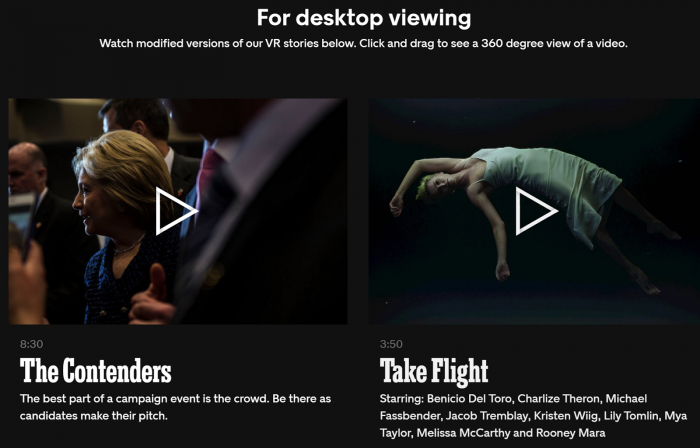
The New York Times, as one of the first major news providers, has created an NYT VR app [23] that can be downloaded for both Apple and Android platforms.
The app can be used in combination with Google Cardboard or any other viewer that accepts your smartphone. By now all major news corporations have 360-degree video offerings.
Graded Assignment: 3D/VR Project Review
Task
Find two examples of 3D/VR projects other than the ones discussed above and write a short paragraph about each. In this exercise, you should select projects that you find exciting and reflect on why you think they will change the geospatial sciences, how information is communicated or made accessible, how people will be able to understand places across space and time differently, etc. Projects do not have to be movies but can address any 3D/VR topics somewhat related to geospatial.
Due Date
Please upload your assignment by 11:59 p.m. Tuesday.
Guidelines and Writing Rubric
In your reflection make sure that you answer the following questions:
- Which aspects of the geospatial sciences will be affected most?
- There are many other aspects to consider such as communicating and sharing health information, fostering social engagement, communicating climate change. Which field do you think will be affected most?
- Does the length of the videos play a role? How long can you watch movies as immersive experiences?
| Criteria | Full Credit | Half Credit | No Credit | Possible Points |
|---|---|---|---|---|
| Examples provided are different from course examples. | 2 pts | 1 pts | 0 pts | 2 pts |
| Link to the website/app and description of the platform through which the student experienced the movie is provided. | 1 pts | .5 pts | 0 pts | 1 pts |
| Reflection is well thought out, researched, organized, and answers the questions posed in the lesson. | 4 pts | 2 pts | 0 pts | 4 pts |
| The document is grammatically correct, typo-free and cited where necessary. | 1 pts | .5 pts | 0 pts | 1 pts |
| Total Points: 8 |
Summary and Tasks Reminder
Summary and Tasks Reminder
In this introductory lesson, we went through a plethora of topics contributing to the excitement and opportunities that 3D modeling and VR have for the geospatial sciences but also for society at large. It is a legitimate question whether or not communication about places through time and space will be the same after 3D/VR technologies have entered mainstream fully. There are a lot of opportunities and there are still a lot of unknowns. The lack of content, despite a booming market, has been identified as the main obstacle for VR; geospatial sciences through 3D modeling developments are in an excellent position to play a key role as content providers and also benefit from a booming VR market in return. We are at the verge of a new era of information systems that will allow for the development of immersive experiences alongside classic visualization techniques.
In the next lesson, we will talk more about the different workflows that are in place or developing that allow for the creation of 3D content.
Reminder - Complete all of the Lesson 1 tasks!
You have reached the end of Lesson 1! Double-check the to-do list on the Lesson 1 Overview page to make sure you have completed all of the activities listed there before you begin Lesson 2.